 Games
Games  Sign Up
  Search
  Promotions
Revery Play Casino Login and Sign Up for UK Players
Revery Play Casino registration process gives new users access to our game catalog, sourced from 100+ studios. The entire process takes under 5 minutes, and it only requires the standard details most online players already have. The information you provide during registration is secured with our 128-bit SSL encryption, and our KYC verification protocols ensure that there are no illegal entries.
Only players who complete our registration process and fund their account can claim our matched deposit bonus of up to 5,000 GBP with 250 free spins. This page will show you how to complete the sign up process, including verification and common issues that may arise.

How to Create a Revery Play Casino Account
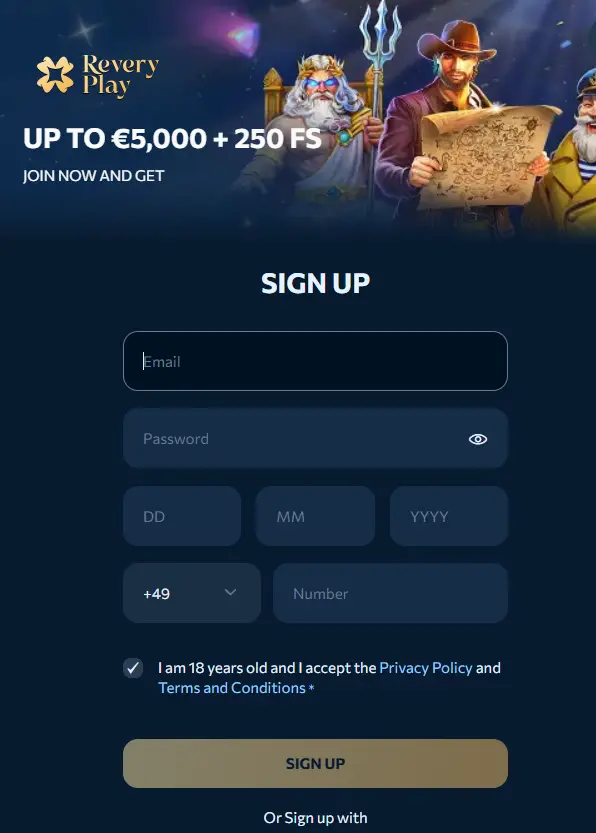
Revery Play Casino sign up is the first step before you can deposit and play at our casino. You will provide an email address and set a password that meets the site’s requirements. To begin, go to the Revery Play Casino homepage and select Sign Up at the top right corner. This opens the form where you enter your email, password and phone number.
Then, input your birthdate and certify that you’re above 18 years by ticking the terms and conditions box. Ensure you really understand and read through the fine print to avoid future mistakes and complications. After that, you can proceed with selecting your preferred currency in which you will be using to play our casino games. The available options we provide include:
- EUR
- GBP
- USD
- Bitcoin
- Ethereum
- Other cryptocurrencies.
The final process is to verify the email address you provided. We will send a verification link to your email. Open your inbox and then follow the link to activate your account.
How to Verify Your Revery Play Casino Account
Account verification is a crucial part of the Revery Play Casino registration process. It ensures compliance with legal standards, secures user data and unlocks full access to our core features, including access to casino games, deposits, withdrawals and promotions. To start, you need to provide the documents in the table below;
| Verification Requirement | Details |
|---|---|
| A photo ID | This could be a passport, driver’s licence, or national ID card |
| Proof of Address | This could be a utility bill or bank statement, no older than three months |
| Payment system verification | This includes a clear photo of the card used, with only the last four digits and your name visible |
After uploading these documents, you have to wait for a review from our end. This usually takes a few hours, but may extend up to three days depending on document quality and staff workload.
Secure ReveryPlay Casino Login
The steps below describe the Revery Play Casino login flow from the site’s official page to submitting your registered credentials.
- The Sign In Button
Proceed to the official website and click on the Sign In button located at the top right corner of the page.
- Enter Your Details
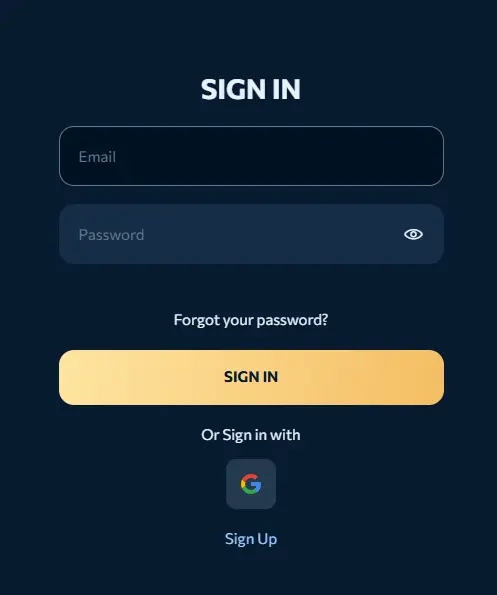
The Sign In tab takes you to a page where you have to enter your registered email and password. If you don’t remember your password, simply click on the forgotten password link to reset it.
- Submit
After inputting your Revery Play Casino login details, click on submit to complete. The next page will take you to Revery’s play game catalogues, where you can choose from several bespoke titles.
If you prefer a quicker means of accessing your account, simply click on the Google sign-in at the bottom. The page takes you to your Google account page, where you need to select the email address you want to use. Google will ask you to verify if you want to allow us to access your information. Click on continue to complete the sign-in process.
Login via Mobile App
The entire Revery Play login process on the app is similar to the website procedure. The only difference is that you have to download the app from our official site first. Simply visit our official website and tap the three dots at the top of the page to open your browser menu on Chrome.
From the list of options, select Add to the Home Screen from the menu list. Then, a pop-up window will appear asking you to either install or create a shortcut. Select Install and then confirm your choice by clicking “Install” for the second time.
Once the App is installed on your phone, click on the Sign-In tab at the top of the screen. Proceed to filling the form by inputting your email and password before clicking on Sign In. Again, you can use the Google Icon for a much quicker and faster ReveryPlay Casino login.
Personal Data
Our casino collects three types of personal information from users. These include:
- User Identity Details
- Gameplay Data
- Payment Data
The user Identity details are data that distinguishes users on our platform. They often come in the form of date of birth, email, address and phone number. Then, we collect gameplay data, which captures the behavioural aspects of a punter, especially how they react with the platform.
They can be in the form of browsing habits, preferred games, betting activity, login times and device information. Finally, we collect payment or transaction data that encompasses deposit details, withdrawals and payment methods.
We employ a variety of security measures to safeguard our users’ data. Whether it is through our advanced 128-bit SSL encryption, our multifactor authentication, firewalls and secure data storage systems, players’ privacy remains our top priority.
Common Revery Play Casino Login Problems for UK Players
If you’re experiencing difficulties in the ReveryPlay login process, the table below has some common issues and their solutions.
| Login Issues | Solution |
|---|---|
| Invalid Email | Input the standard email format [email protected] you used in opening your account. Ensure that there are no typos and no spaces when you input it. |
| Rejected Passwords | Check your password again to ensure that you typed in all the characters and spaces you used in opening your account. If you don’t remember your password, use the “Forgot Your Password?” option to reset it. |
| Technical Glitches | Clear your browser’s cache and cookies, then try Revery Play login again. If the issue persists, try logging in from a different device or web browser. |
| Account Restrictions | Contact a customer representative and explain the restrictions on your account. |
How to Delete Your Account at Revery Play Casino
Deleting your account is not as simple as the Revery Play Casino sign up process. However, with these steps, you can achieve it with less hassle.
- Withdraw Your Funds: The first thing you want to do when you’ve made up your mind to close your account is to withdraw your funds. And that’s because once the process starts, any balance in your portfolio will automatically be deleted.
- Contact Our Customer Care: Now, you need to reach out to our customer care service agent to put in the request for the closure of your account. You can do this through email or chat. The agent will often ask the reason behind the account closure. Kindly state the reason to help us improve our services.
- Provide the Necessary Details: Our agents may ask for some form of identification, be it a passport, driver’s licence, or national ID card. Once you provide these documents, the process for your account closure will start.
- Confirm: The process may take 3 to 5 days, and you will need to confirm your choice within that period. If the request exceeds the stipulated time, check in with the customer representative to see how the process is going.
Password Recovery Instructions
When you forgot your password details, our casino has a procedure for recovering your account. First, visit our official website and click on Forget Your Password on the ReveryPlay login page. The password reset page will pop up. Then, you have to type in your email address and click on the Reset Password tab. Our casino will email you to the email address you provided, detailing how to reset your password. Once you receive the email, follow the instructions to successfully reset your password.


